
CellMethMarker Help Documentation
CellMethMarker is a web-accessible resource for exploring human cell- and tissue-specific DNA methylation markers. This help page introduces the database content, search modules, genome browser, analysis tools, case studies, and downloadable files.
Overview
What is CellMethMarker?
CellMethMarker is a curated database designed to support the discovery, search, visualization, and interpretation of DNA methylation markers associated with human cell and tissue identity. The database integrates custom markers generated from uniformly processed WGBS and RRBS datasets, manually curated literature markers, harmonized sample metadata, genome browser visualization, and downstream analysis tools.
The database is intended for researchers working on epigenetics, methylome analysis, cell-type annotation, tissue-of-origin inference, cell-free DNA analysis, and methylation-based biomarker discovery.
Data resources
The current version of CellMethMarker contains three major data resources:
| Resource | Description | Main content |
|---|---|---|
| Custom markers | Cell-/tissue-specific methylation markers generated from uniformly processed WGBS and RRBS datasets. | 347,514 custom marker records across 55 cell/tissue types. |
| Literature markers | Manually curated DNA methylation markers collected from published studies. | 2,203,507 marker records from 78 eligible publications, covering 179 human cell or tissue types and 17 assay types. |
| Sample metadata | Curated metadata for human DNA methylation datasets. | 2,810 human methylation samples across 63 study series. |
Coordinate system
CellMethMarker uses hg19/GRCh37 as the primary coordinate system for online search, genome browser visualization, and marker display. Downloadable files may include additional lifted-over versions when available. When using coordinate search or comparing CellMethMarker records with external datasets, please ensure that the coordinate system is consistent.
Quick Start
Navigation map
The website is organized into several major modules:
| Menu | Page | Purpose |
|---|---|---|
| Home | Home page | Provides an overview of the database, data scale, and major functions. |
| Search | Custom Marker Search | Search de novo WGBS/RRBS cell- and tissue-specific markers. |
| Search | Literature Marker Search | Search manually curated methylation markers from published studies. |
| Search | Sample Metadata Search | Browse curated methylation sample metadata. |
| Search | Coordinate Search | Find markers overlapping a genomic region. |
| Genome Browser | JBrowse-based genome browser | Visualize markers, annotations, and methylation profiles along the genome. |
| Analysis | Methylation Heatmap | Generate methylation heatmaps for input gene symbols. |
| Analysis | Sample Clustering | Explore sample relationships based on methylation profiles. |
| Case Studies | Cell-type Annotation | Demonstrates how CellMethMarker can assist methylation-based cell-type annotation. |
| Case Studies | Cell-type Deconvolution | Demonstrates how CellMethMarker custom markers can support methylation-based cell-type deconvolution reference construction. |
| Download | Download page | Provides downloadable marker files, metadata files, and related resources. |
Typical workflows
-
Find markers for a cell or tissue type: open Custom Marker Search or Literature Marker Search, select a cell/tissue type from the sidebar, adjust filters, and review the result table.
-
Check whether a genomic region contains markers: open Coordinate Search, enter a genomic interval in hg19, and inspect overlapping marker records.
-
Visualize markers in genomic context: open Genome Browser, navigate to a gene or coordinate, and enable relevant tracks from the track selector.
-
Compare methylation patterns for selected genes: open Methylation Heatmap, enter official gene symbols, choose WGBS or RRBS, and generate the heatmap plot and table..
-
Explore sample-level structure: open Sample Clustering, enter official gene symbols, choose the assay and clustering settings, and generate the clustering plot and table.
Search Modules
Custom Marker Search
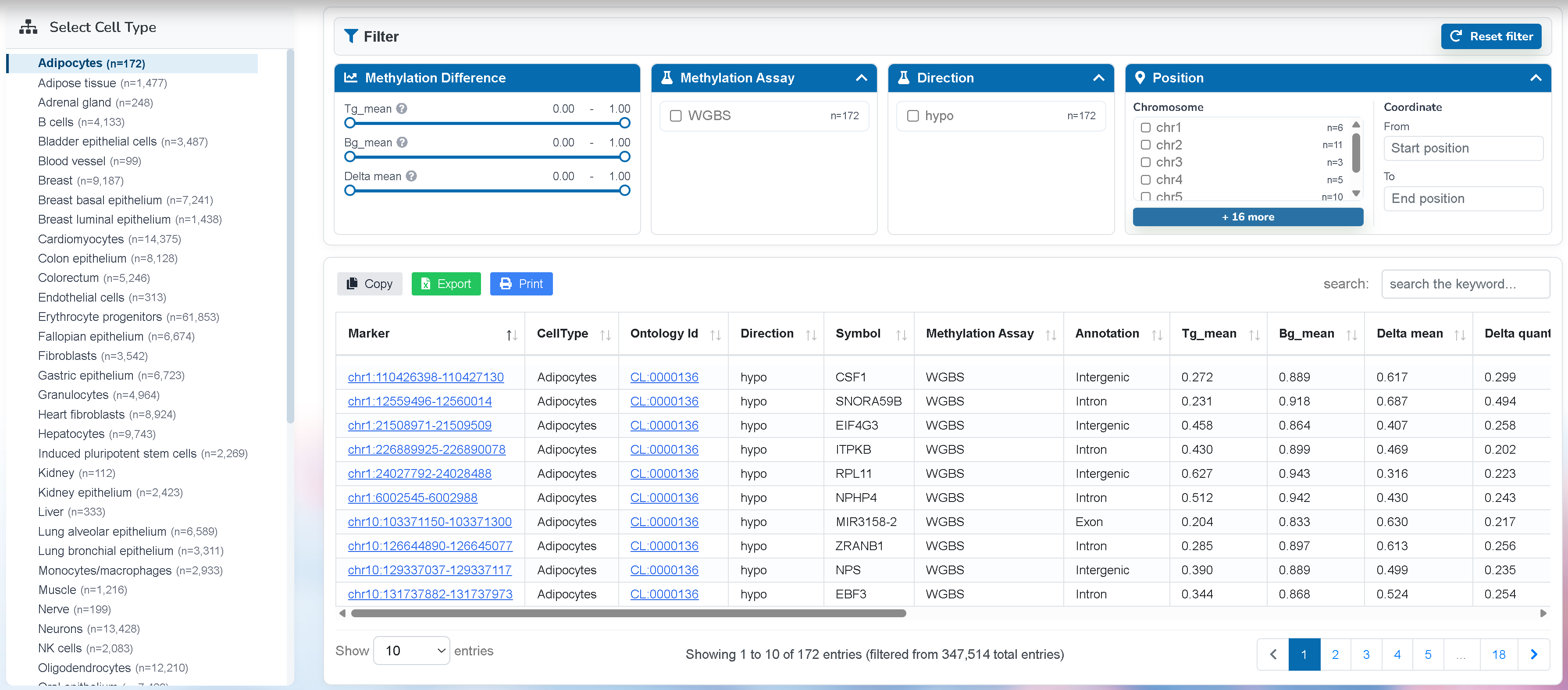
The Custom Marker Search page provides access to de novo cell-/tissue-specific methylation markers generated from uniformly processed WGBS and RRBS datasets. These markers are designed to represent methylation signatures that distinguish specific cell or tissue types.
Main functions
-
Select a cell or tissue type from the left-side cell type tree. The number next to each item indicates the number of available custom marker records for that cell or tissue type.
-
Use the filter panel to refine the result table. Available filters include methylation difference, methylation assay, methylation direction, chromosome, and genomic coordinate range.
-
Review the result table. Each row represents one custom methylation marker region.
-
Click a marker coordinate to open the corresponding coordinate search page and inspect related records around that genomic region.
-
Use the table search box for keyword-based refinement.
-
Use Copy, Export, or Print to save the current filtered result table. The Export function downloads records matching the current search and filter settings.
Output
-
Marker: genomic coordinate of the methylation marker.
-
CellType: cell or tissue type associated with the marker.
-
Ontology Id: ontology identifier for the cell or tissue type, when available.
-
Direction: methylation direction in the target cell/tissue type, such as hyper or hypo.
-
Symbol: associated gene symbol.
-
Methylation Assay: assay type used to generate the marker, such as WGBS or RRBS.
-
Annotation: genomic annotation of the marker region.
-
Tg_mean, Bg_mean, Delta mean: methylation summary values used to describe the difference between target and background groups.
When to use this page
Use this page when you want to identify cell-/tissue-specific methylation markers generated from uniformly processed WGBS or RRBS datasets.
Literature Marker Search
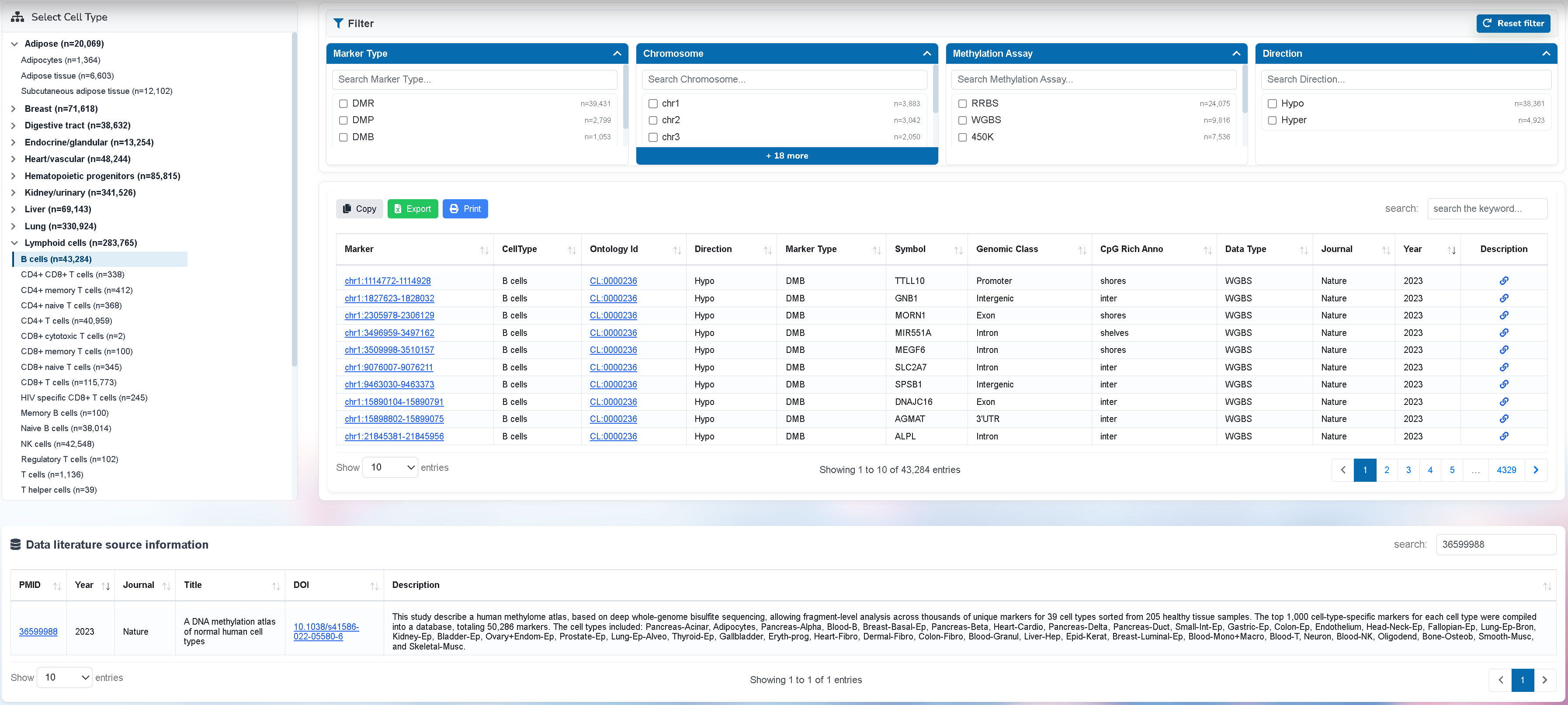
The Literature Marker Search page provides manually curated methylation markers extracted from published studies. These records include markers generated by multiple methylation profiling technologies, including sequencing-based and array-based assays.
Main functions
-
Select a cell or tissue category from the left-side tree. Literature markers are grouped by curated cell or tissue labels.
-
Use the filter panel to refine records by marker type, chromosome, methylation assay, and methylation direction.
-
Review the main literature marker table. Each row represents a marker reported or derived from published literature.
-
Click the PMID value in the marker table to load the corresponding publication record in the literature source table below.
-
Use the source information table to inspect publication year, journal, title, DOI, and description.
-
Use Copy, Export, or Print to save marker records matching the current filter settings.
Difference from Custom Marker Search
-
Custom markers are generated by CellMethMarker from uniformly processed WGBS/RRBS datasets.
-
Literature markers are manually curated from published studies and may come from different methylation platforms, marker definitions, and analysis workflows.
-
Custom markers are more standardized across the database, while literature markers provide broader published evidence and references.
Output
-
Marker: genomic coordinate of the literature marker.
-
CellType: curated cell or tissue type.
-
Marker Type: type of literature marker, such as DMR, DMP, or DMB.
-
Methylation Assay: methylation profiling platform or assay.
-
PMID: PubMed identifier linked to the source publication.
-
Literature source table: publication-level information associated with the selected marker records.
When to use this page
Use this page when you want to compare CellMethMarker custom markers with previously published markers, investigate literature support for a marker, or collect markers reported across different methylation platforms.
Sample Metadata Search
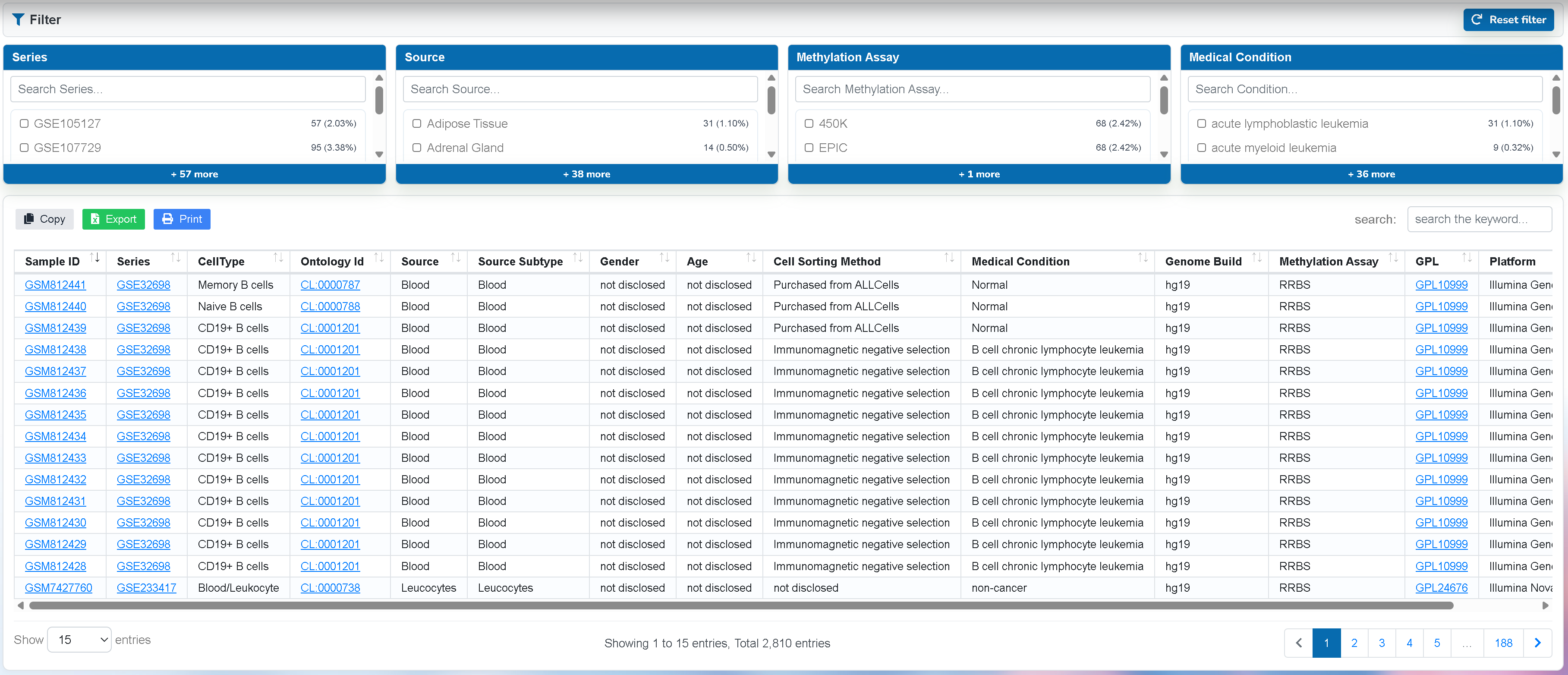
The Sample Metadata Search page provides curated metadata for human methylation samples used or referenced by CellMethMarker. Metadata fields may include sample ID, study series, cell/tissue type, biological source, methylation assay, and cell-sorting or sample preparation information.
Main functions
-
Search and filter sample records using metadata fields.
-
Inspect assay type, study accession, sample identity, and biological annotation.
-
Use sample metadata to understand the source and context of methylation profiles.
-
Export table results for local documentation or downstream analysis.
Recommended usage
Use this page when you need to trace marker resources back to their source samples, examine the composition of the reference datasets, or identify methylation datasets relevant to a specific cell or tissue type.
Coordinate Search
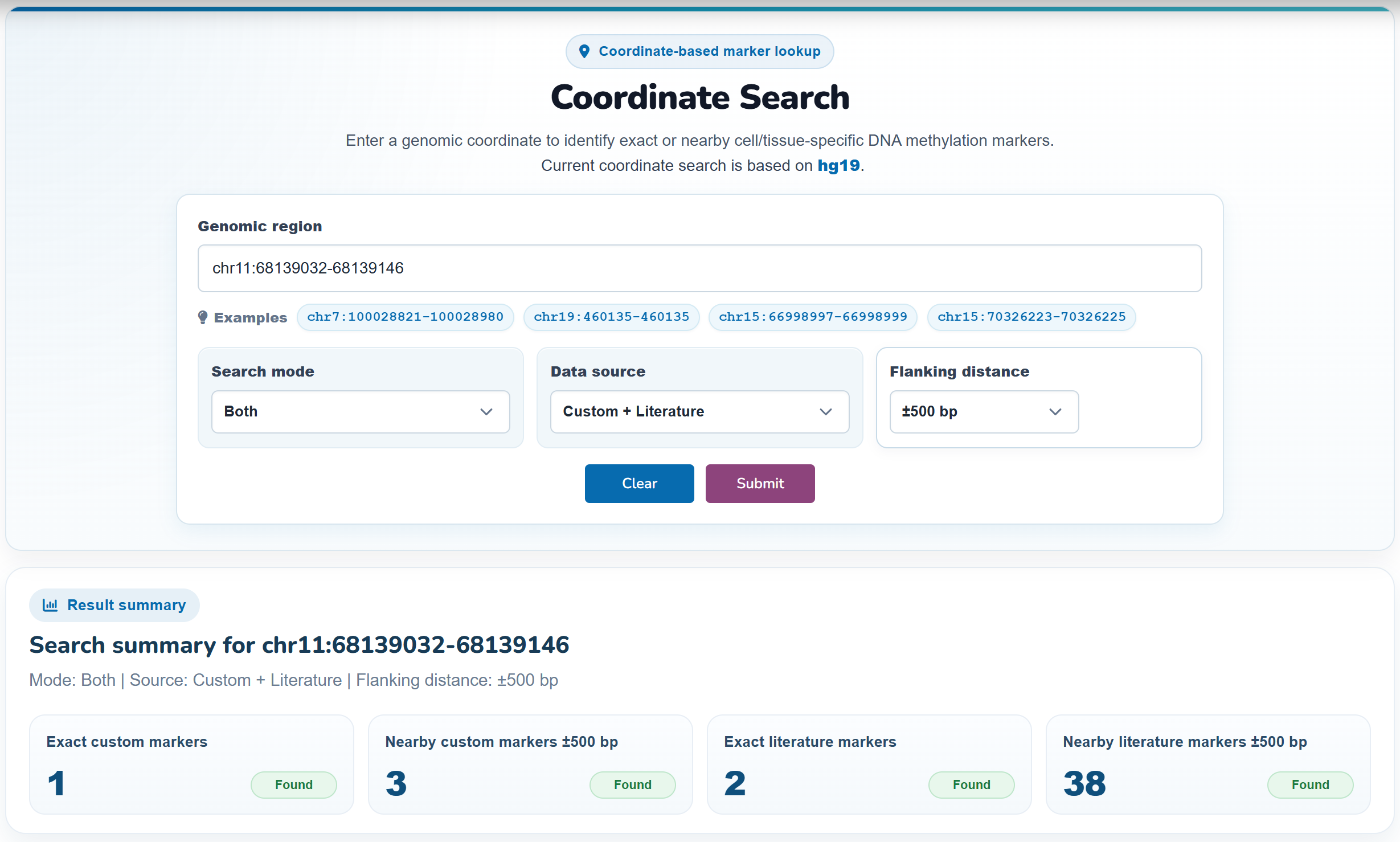
The Coordinate Search page allows users to search for markers overlapping a genomic interval. This is useful when you are starting from a genomic locus, candidate region, regulatory element, or gene-associated interval.
How to use
-
Enter a genomic coordinate using hg19 format, for example:
chr11:68139032-68139146 -
Set the Search mode to search exact matches, nearby overlapping regions, or both; choose the Data source to query custom markers, literature markers, or both; and adjust the Flanking distance to extend the input region when searching for nearby markers.
-
Submit the query to find markers overlapping the input region.
-
Review matched records in the result tables.
-
Click marker coordinates or PMID links when available to inspect related marker or literature information.
Result interpretation
-
Custom marker results show markers generated from CellMethMarker processed datasets. These records are useful for identifying standardized cell-/tissue-specific methylation signatures around the queried region.
-
Literature marker results show markers curated from published studies. These records are useful for checking whether the region has been reported previously in the literature.
-
If no records are returned, the region may not overlap any marker currently included in CellMethMarker, or the coordinate build may not match hg19.
Notes
Use hg19/GRCh37 coordinates for online coordinate search. If your input region is based on hg38 or another genome build, convert it before searching.
Genome Browser
The Genome Browser page embeds a JBrowse-based genome browser for exploring CellMethMarker records in genomic context. It allows users to view marker tracks, reference annotations, CpG islands, and methylation signal tracks along the hg19 genome.
Default view
To improve loading speed, the genome browser may open with a reduced number of default tracks. Reference annotation tracks such as GENCODE genes and CpG islands are suitable for the first view. Additional WGBS, RRBS, marker, or methylation profile tracks can be enabled manually from the track selector.
Main functions
-
Navigate by chromosome, genomic coordinate, or gene region.
-
Turn tracks on or off using the hierarchical track selector.
-
Inspect marker features and genomic annotations by clicking features in the browser.
-
Compare custom markers, literature-related annotations, CpG islands, and methylation profiles in the same genomic region.
Usage notes
-
Large quantitative tracks may take longer to load, especially when many tracks are opened simultaneously.
-
If the browser appears slow, close unnecessary tracks and open only the tracks needed for the current region.
-
Genome browser coordinates are based on hg19/GRCh37.
Visualization and Analysis
Methylation Heatmap
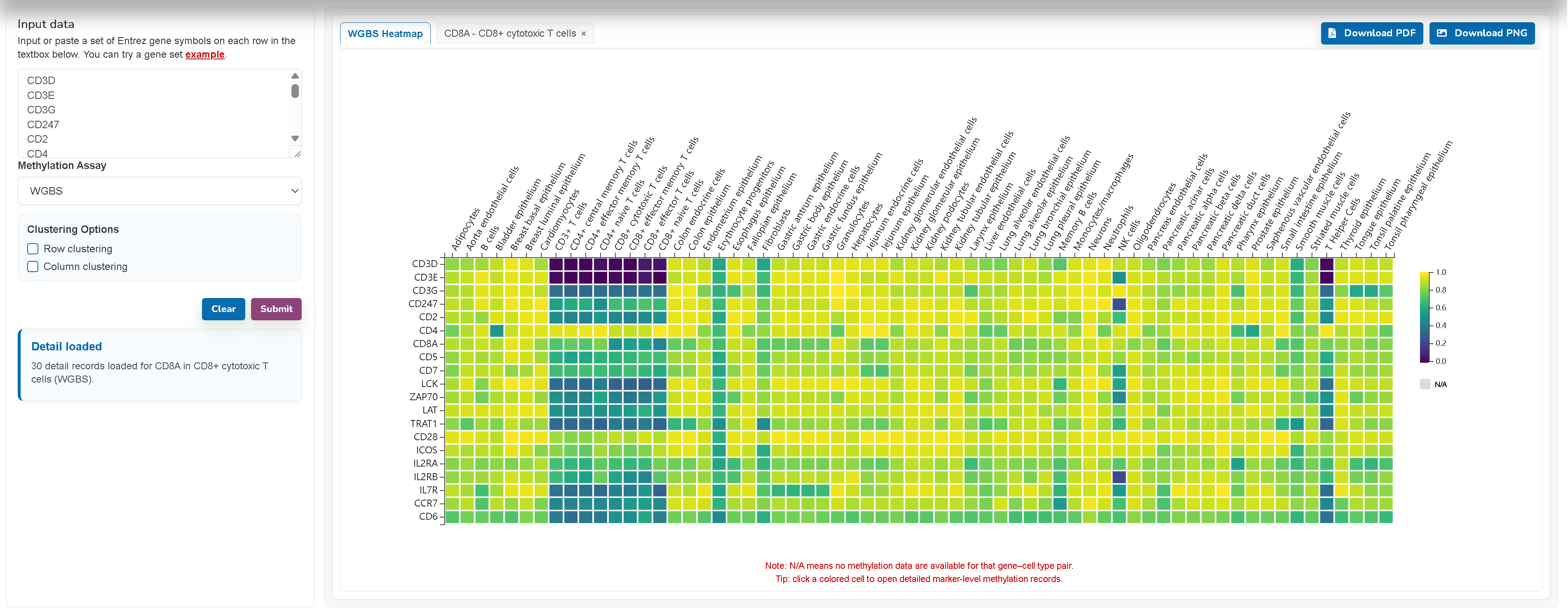
The Methylation Heatmap page visualizes methylation levels across cell or tissue types for a user-supplied gene list. It supports WGBS and RRBS assays and provides heatmap, methylation value table, and export functions.
How to use
-
Enter official gene symbols in the input box, one symbol per line.
-
Select the methylation assay: WGBS or RRBS.
-
Optionally enable row clustering, column clustering, or both.
-
Click Submit to generate the heatmap.
-
Review the heatmap. Rows represent input genes and columns represent cell or tissue types.
-
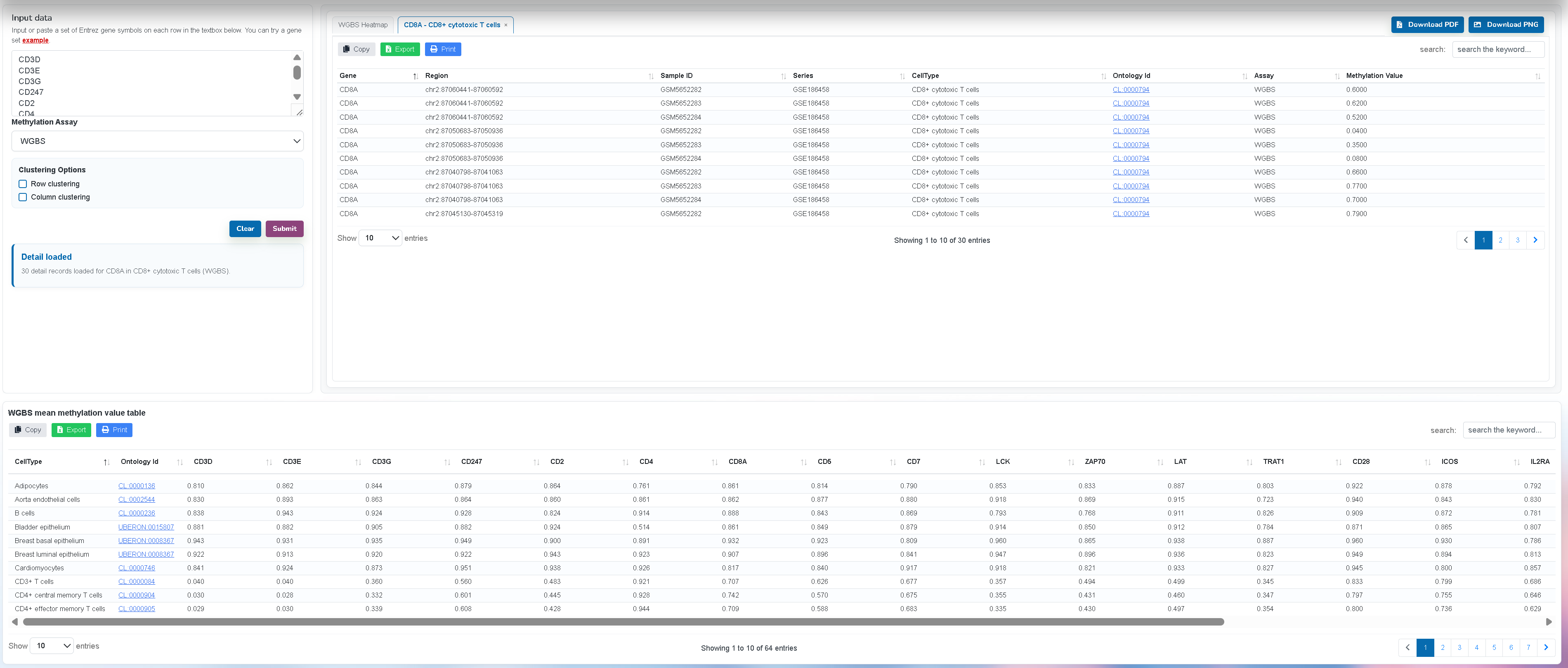
Click a colored heatmap cell to open detailed marker-level methylation records for the corresponding gene and cell/tissue type.
-
Use the detailed record table to inspect the underlying genomic marker regions, sample IDs, study series, ontology information, assay type, and methylation values.
-
Review unmatched genes in the notification panel if any are not found.
-
Download the heatmap as PDF or PNG when available.
Example input
PRMT7
LMX1B
LRP5
Output
-
Heatmap: visual comparison of methylation levels across cell/tissue types.
-
Mean methylation value table: numeric values corresponding to the heatmap.
-
Detailed marker records: click-through tables opened from heatmap cells, allowing users to examine the marker-level evidence behind a specific gene-cell/tissue association.
-
Notifications: information about unmatched genes and usage messages.
Notes
-
N/A indicates that no methylation data are available for that gene-cell type pair under the selected assay.
-
If a gene is not found, check whether the symbol is an official gene symbol and whether the selected assay contains data for that gene.
Sample Clustering
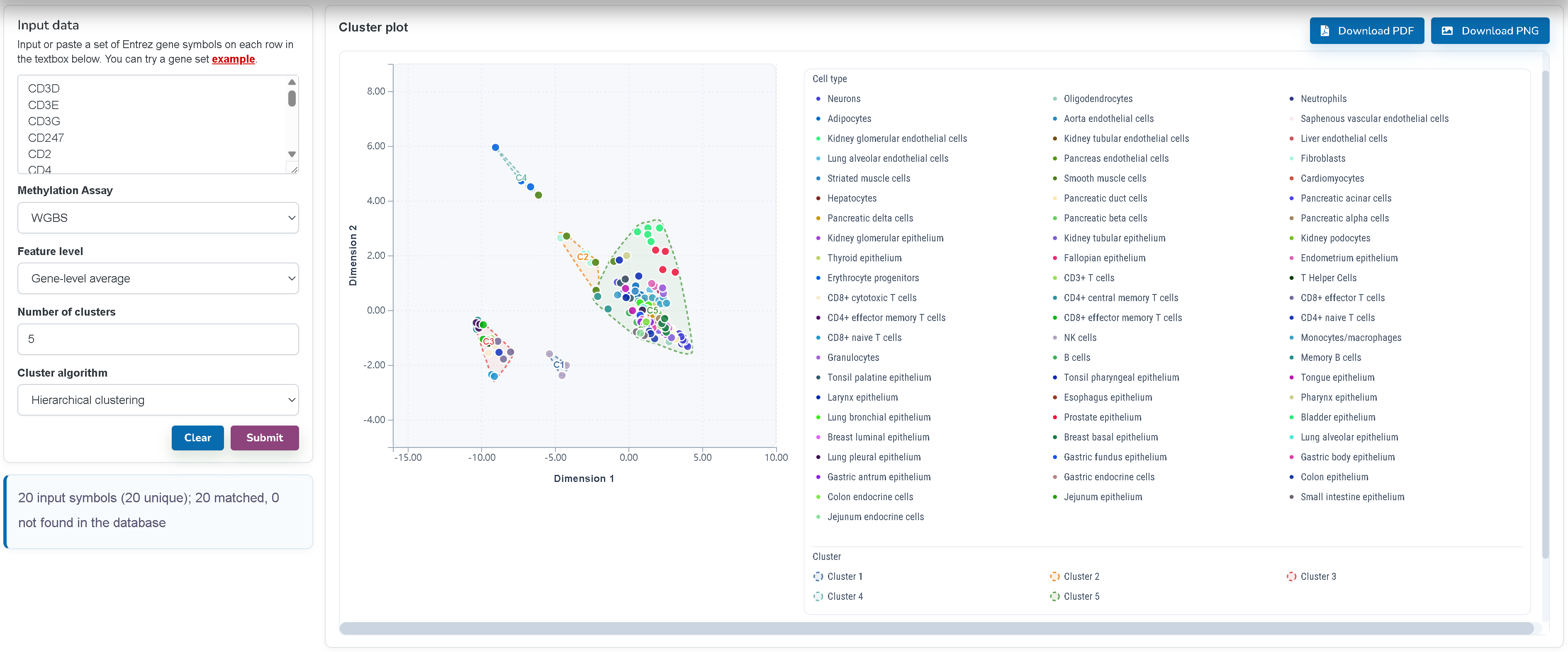
The Sample Clustering page provides an interactive analysis tool for exploring relationships among methylation samples. It supports WGBS/RRBS-based visualization and allows users to inspect sample grouping patterns.
How to use
-
Enter official gene symbols in the input box.
-
Select the methylation assay used for clustering.
-
Submit the query to retrieve methylation values for marker regions associated with the input genes.
-
Review the clustering plot. The plot groups samples according to similarity in methylation profiles.
-
Inspect the accompanying sample table to identify sample IDs, study series, cell/tissue types, assay information, and related metadata.
-
Use the plot and table together to evaluate whether samples cluster according to expected biological categories.
How to interpret the result
-
Samples that cluster close together have more similar methylation profiles across the selected marker regions.
-
Clusters may reflect biological factors such as cell type or tissue type, but may also be affected by assay type, dataset source, sample quality, or batch effects.
-
The accompanying table helps identify which samples contribute to each pattern observed in the clustering plot.
When to use this page
Use this page when you want to explore whether selected marker-associated methylation signals separate samples by cell type, tissue type, or other sample-level metadata.
Case Studies
Cell-type Annotation
The Cell-type Annotation case study demonstrates how CellMethMarker custom markers can be used to interpret methylation-based cell identities. The case study shows how marker regions can be transferred to an independent single-cell methylome atlas and used to evaluate whether expected cell-type-specific hypomethylation patterns are recovered.
What this case study illustrates
-
How WGBS and RRBS custom markers can support methylation-based cell-type annotation.
-
How marker-region methylation can be more directly informative than promoter methylation of conventional expression-derived marker genes.
-
How CellMethMarker can be used as a reference resource for interpreting single-cell, bulk, or cell-free methylome signals.
Users who are new to methylation-based annotation are encouraged to read the case study before using the marker search and genome browser modules for their own data.
Cell-type Deconvolution
The Cell-type Deconvolution case study illustrates how CellMethMarker custom markers can be used to build a platform-matched methylation reference atlas for estimating cell-type proportions in bulk methylation samples. The example focuses on RRBS-based benchmark samples and compares a CellMethMarker-derived RRBS reference with the UXM default WGBS reference.
What this case study illustrates
-
How CellMethMarker custom markers can be selected to construct a reference atlas for methylation-based deconvolution.
-
Why platform compatibility between the query data and the reference atlas can affect deconvolution performance.
-
How benchmark metrics such as RMSE can be used to compare estimated cell-type proportions with expected proportions.
This case study is intended as a practical example of using CellMethMarker marker resources for reference construction. Users should evaluate marker coverage, sample quality, platform compatibility, and study-specific biological context before applying deconvolution to new datasets.
Download
Available files
The Download page provides access to CellMethMarker data files for offline analysis. Available files may include custom marker tables, literature marker tables, sample metadata, marker files prepared for genome browser use, and coordinate-converted versions when available.
Common download categories
-
Custom markers: WGBS/RRBS-derived cell-/tissue-specific methylation markers.
-
Literature markers: manually curated published methylation markers.
-
Sample metadata: curated metadata for methylation samples.
FAQ
1. What is the difference between custom markers and literature markers?
Custom markers are generated by the CellMethMarker team from uniformly processed WGBS and RRBS datasets. Literature markers are manually curated from published studies and may come from many different methylation technologies and analysis pipelines.
2. Which genome build should I use?
Online search and visualization are based on hg19/GRCh37. If your data are in hg38 or another build, convert coordinates before direct comparison, or use downloadable lifted-over files when provided.
3. What does Hyper or Hypo mean?
Hyper indicates higher methylation in the target cell/tissue type or comparison group, while Hypo indicates lower methylation. The exact interpretation depends on the marker source and comparison design.
4. Why are some genes not found in the Heatmap page?
A gene may be unmatched if it is not covered by the selected assay, has no associated marker region in the current dataset, or if the input symbol does not match the official gene symbol used by the database.
5. Why does the Genome Browser load additional data after the page appears?
Genome browser tracks are loaded dynamically. The page itself may appear quickly, while JBrowse continues to request configuration, annotation, and track data in the background. Opening fewer tracks can improve loading speed.
6. Can I use CellMethMarker data for downstream analysis?
Yes. The Download page provides data files that can be used for local analysis, including marker filtering, enrichment analysis, methylation annotation, and tissue-of-origin interpretation. Please check file descriptions and coordinate systems before use.
7. How should I cite marker records from literature?
For literature markers, cite both CellMethMarker and the original publication when the marker record is used directly. PMID and reference information are provided in the literature marker table when available.
Contact Us
If you encounter problems, have suggestions, or would like to report missing or incorrect marker information, please contact the CellMethMarker development team. When reporting an issue, include the page name, input query, browser information, and a brief description of the problem so that it can be reproduced efficiently.
CellMethMarker is continuously updated. User feedback is welcome and will help improve the quality, usability, and coverage of the database.
Jiantao Shi: jtshi@cmpt.ac.cn
Fan Zhang: fzhang@cmpt.ac.cn
XiaoJun Sun: xjsun@mail.ustc.edu.cn
YuJie Peng: peng_yujie@mail.ustc.edu.cn